Components
Render your own React components inside Sharkord.
Plugins can render React components into fixed slots of the interface, and add their own tabs to the plugin's page in the server settings. They run in every connected user's browser, on the app's own origin.
Slots
| Slot | Props | Where it renders |
|---|---|---|
CONNECT_SCREEN | none | Below the logo and server name on the connect screen |
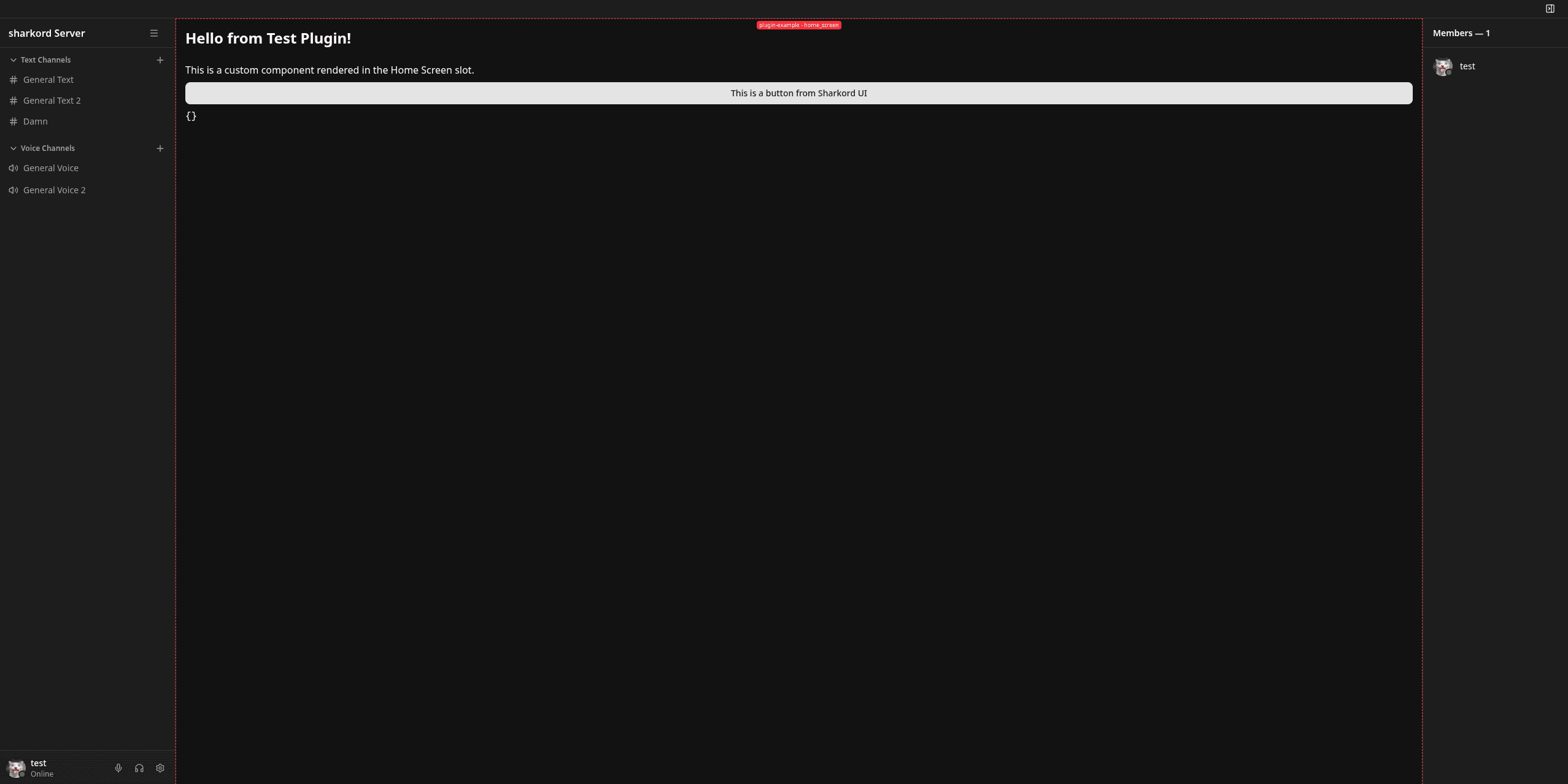
HOME_SCREEN | none | The screen a user lands on after connecting |
CHAT_ACTIONS | { channelId } | The chat input area, next to the existing buttons |
MESSAGE_ACTIONS | { messageId, channelId } | The hover toolbar on a message, before the quick reactions |
MESSAGE_FOOTER | { messageId, channelId } | Under a message, below its reactions and above its attachments |
MEMBER_LIST_ITEM | { userId } | Each row of the member list in the right sidebar |
USER_POPOVER | { userId } | The card that opens when a user is clicked |
CHANNEL_HEADER | { channelId } | The channel's top bar, before the pinned-messages button |
TOPBAR_RIGHT | none | The right side of the top bar |
FULL_SCREEN | none | A full-screen view, with a button added to the left sidebar to open it |
USER_SETTINGS | none | The plugin's own entry in user settings, next to Profile and Notifications |
A plugin can fill several slots, and each slot takes a list of components. Several plugins can fill the same slot, and you cannot control the order.
CHAT_ACTIONS renders in the main channel composer only, not in the thread sidebar's.
Export a Slot Map
// src/client/index.ts
import { PluginSlot } from "@sharkord/plugin-sdk";
import type { TPluginComponentsMapBySlotId } from "@sharkord/plugin-sdk/client";
import { Home } from "./home";
import { PinButton } from "./pin-button";
import { Preferences } from "./preferences";

const components: TPluginComponentsMapBySlotId = {
  [PluginSlot.HOME_SCREEN]: [Home],
  [PluginSlot.MESSAGE_ACTIONS]: [PinButton],
  [PluginSlot.USER_SETTINGS]: [Preferences],
};

export { components };
The map types each slot's components from its props, so a component in the wrong slot is a type error, and one that takes no props still fits anywhere.
Slot Props
A slot that renders inside something tells the component what that something is:
const PinButton = ({ messageId, channelId }: { messageId: number; channelId: number }) => {
  const onClick = () => callAction("pin", { messageId });

  return <button onClick={onClick}>Pin</button>;
};
This is the only way a component can know. The store's selectedChannelId is a guess, and it is the wrong answer inside a thread; nothing in the store says which message a row belongs to at all.
Props are ids only. Anything else about a message or a user is a lookup you can do yourself, and the right place for it is a server action, where your plugin has the whole row rather than the slice the client happens to hold.
TPluginSlotProps is exported from @sharkord/plugin-sdk if you want to name a slot's props type instead of writing it out.
It is the one slot that scales with the size of your server. Keep it cheap: no fetching, no per-row subscriptions.
Turn the UI On
Exporting components is not enough. The server decides which plugins contribute UI, so call ctx.ui.enable() in onLoad:
// src/server/index.ts
const onLoad = async (ctx: PluginContext) => {
  ctx.ui.enable();
};
ctx.ui.disable() takes it away again; clients are told either way and update without a reload. Until enable() is called, no user's browser loads your client bundle, though an admin opening the plugin's page in the server settings still loads it for the tabs below.
Restricting a Slot
enable() takes an optional { [slot]: Permission } map, declaring what a user needs to hold before that slot's components render for them:
import { Permission, PluginSlot } from "@sharkord/plugin-sdk";

ctx.ui.enable({
  [PluginSlot.CHAT_ACTIONS]: Permission.MANAGE_MESSAGES,
});
Every entry is optional, and a slot left out is public. Like requires on a command, this is a default an admin can override in the plugin's permissions tab.
The rules reach every client and the server refuses nothing on their basis.
Declare the same permission on the command or action behind the component, and
check ctx.permissions inside it. That check is what is actually enforced.
Admin Tabs
A second export adds your own tabs to the plugin's page in the server settings, beside Settings, Commands and Logs. Only someone who can manage plugins ever sees them.
// src/client/index.ts
import type { TPluginTabs } from "@sharkord/plugin-sdk/client";
import { Stats } from "./stats";

const tabs: TPluginTabs = [{ id: "stats", label: "Stats", component: Stats }];

export { tabs };
Each tab needs a unique id, a label in the language you ship, and a component. settings, commands and logs are reserved: a tab claiming one of those, or a duplicate id, is dropped with a warning in the browser console.
Writing the Components
React comes from the host through globals, so your bundle does not ship its own and there is exactly one React on the page. The build tooling rewrites react and react-dom imports for you.
Keep the styling simple. Sharkord compiles Tailwind from its own sources, so a utility class no Sharkord file uses is not in the stylesheet. Use inline styles, and reach for the host's CSS variables so you stay in the user's theme:
const buttonStyle: CSSProperties = {
  padding: "6px 14px",
  borderRadius: "var(--radius)",
  background: "var(--primary)",
  color: "var(--primary-foreground)",
};
For data, read the store with useStoreSelector; for anything privileged, call a server action. See Client SDK.
While You Are Building
Two things the host does that are worth knowing when your component misbehaves:
- F4 toggles a slot overlay. Every rendered plugin component is outlined and labelled with its plugin id and slot, which is the quickest way to see whether yours mounted at all, and where. The setting is remembered per browser.
- Each component is wrapped in an error boundary. One that throws is replaced rather than taking the app down with it, so a broken render shows up as your component missing, not as a blank Sharkord.
client/index.js is served unauthenticated to any browser that asks. Never
put secrets in it, and never rely on client-side checks for authorization.
Example
A component rendered into the home screen: